

The debate over “which code editor is best” has shifted away from syntax highlighting and plugin ecosystems. It is now a fundamental clash of philosophies: The Platform vs. The Agent.
For nearly a decade, Microsoft’s Visual Studio Code (VS Code) has been the undisputed monarch of the development world. It democratized coding with a lightweight architecture that killed off the heavy IDEs of the past. But in the last 18 months, a challenger has entered the ring.
Cursor, an AI-native fork of VS Code, has captured the hearts of developers and the attention of CTOs. It has rewritten the rules of the sport. The question is no longer just about developer preference; it is a business question.
Do you want a tool that helps you write code, or an intelligent partner that writes it with you? At Thinkpeak.ai, we live at this intersection of automation and engineering. Our mission to transform manual operations into sürücüsüz ekosistemler relies on choosing the right tools for the job.

Contact us Now ⬇️⬇️⬇️
The DNA Test: Understanding the Relationship
To understand the comparison, we must clear up a common misconception. Cursor is not a completely new editor built from scratch. It is a hard fork of VS Code. This distinction is critical for three reasons.
First, migration is instant. If you use VS Code, you already know how to use Cursor. All your keybindings, themes, and settings import with a single click.
Second, you retain the extension ecosystem. Cursor supports the massive library of VS Code extensions. You don’t have to give up your favorite linter, debugger, or Docker integration.
Finally, there is the divergence. While they share DNA, Cursor has gutted the internals of VS Code. They injected AI directly into the text rendering engine. This allows it to function as an AI-first evolution designed for speed.
The Core Difference: Native Intelligence vs. Added Plugins
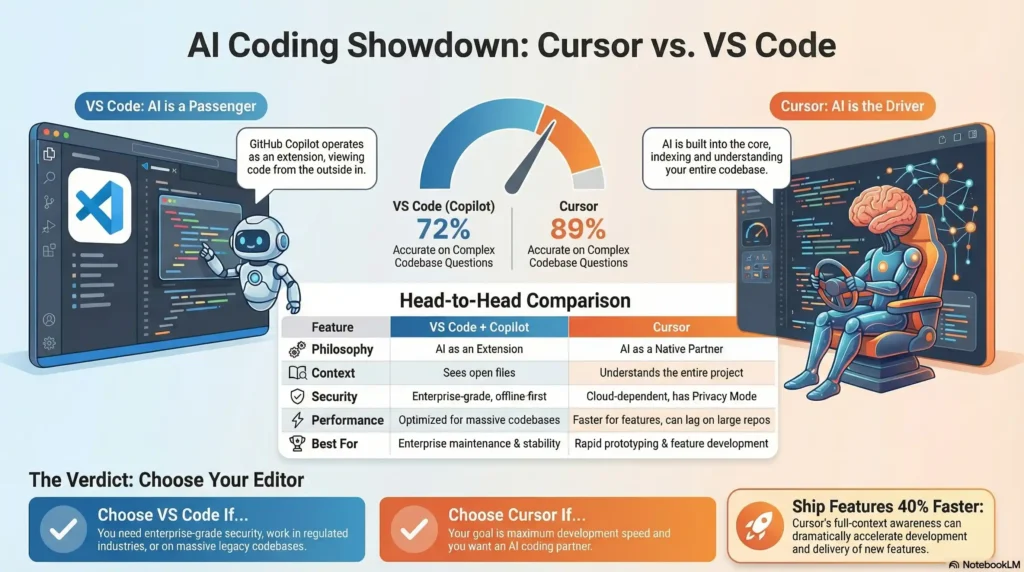
The defining difference between the two editors lies in how they handle Artificial Intelligence. In VS Code, AI (usually GitHub Copilot) is a passenger. In Cursor, AI is the driver.
VS Code + GitHub Copilot (The Plugin Model)
In the VS Code environment, GitHub Copilot operates as an extension. It reads your open files and suggests completions. By 2026, Copilot has evolved significantly to handle larger tasks.
However, it is still bound by the limitations of the plugin API. It looks at your code from the outside in.
Cursor (The Native Model)
Cursor indexes your entire codebase locally using advanced RAG (Retrieval-Augmented Generation) techniques. It doesn’t just look at the open file. It understands the semantic relationship between your frontend components, backend API routes, and database schema.
Recent developer surveys indicate a massive shift for context-heavy queries. For example, asking “Where is the bug in the user authentication flow?” yields different results. Cursor provides accurate answers 89% of the time, compared to 72% for standard Copilot implementations.
Speed is the currency of the modern agency. When our team builds Özel Düşük Kodlu Uygulamalar, we often use Cursor to generate complex functions. The ability for the AI to understand the full context allows us to ship features 40% faster.
Feature Showdown: Composer vs. Workspace
The fiercest battleground in 2026 is Ajan Kodlama. This is the ability to give the editor a high-level command and have it execute changes across multiple files.
Cursor Composer
Cursor’s “Composer” feature allows developers to edit multiple files simultaneously through natural language. You can type instructions like: “Refactor the billing page to use Stripe Elements instead of the old API.”
Cursor will identify the relevant files and plan the edits. It then applies the code changes across multiple files at once. You simply review and accept the plan.
VS Code Copilot Workspace
Microsoft’s answer is Copilot Workspace. It integrates deeply with GitHub Issues and Pull Requests. Its strength is in governance. It excels at taking a GitHub Issue and proposing a plan that links back to the ticket.
However, many developers find the “Flow State” of Cursor Composer to be more fluid. It is better suited for rapid prototyping and intuition-based coding.
The Verdict on Features
For rapid prototyping, Cursor Composer wins. It feels like magic. For enterprise maintenance, VS Code Copilot Workspace wins. It respects the rigid structure of enterprise ticketing systems.
The Thinkpeak Angle: Accelerating Business Logic
At Thinkpeak.ai, we don’t just write code; we build automation solutions. The choice of editor impacts how quickly we can deliver value to our clients.
1. Instant Deployment & Automation
Bizim için Otomasyon Pazaryeri, we provide plug-and-play templates. Clients often need custom JSON scripts or Python data transformers to bridge specific gaps. Using Cursor allows business owners to generate these snippets instantly.
For example, a client using our tools might need a regex script to clean phone numbers. Cursor can generate this script in seconds because it understands the specific context of the client’s data structure.
2. Ismarlama Mühendislik
When we engage in Ismarlama Dahili Araçlar development, we use the “Limitless” tier. We might be building a complex portal using Retool or Glide. These low-code platforms still require SQL queries and JavaScript.
Cursor’s ability to “chat with your database schema” makes writing complex SQL queries trivial. This significantly reduces the time-to-delivery for client dashboards.
3. AI Agent Development
Bizim Özel Yapay Zeka Aracı Geliştirme service builds “Digital Employees” for businesses. Ironically, we use AI to build AI. Cursor’s support for various models allows our engineers to test different reasoning engines rapidly.
Whether you need a custom app built in record time or a pre-built automation, we leverage the cutting edge of AI development. Don’t just read about AI efficiency—build your business on it.
Security and Privacy: The Enterprise Barrier
This is where the comparison gets complicated. For a freelancer or a startup, Cursor is a no-brainer. For a Fortune 500 company, it is a compliance hurdle.
The VS Code Advantage
VS Code is an offline-first editor. If you don’t install plugins, no code leaves your machine. GitHub Copilot has spent years building enterprise-grade trust.
It offers “Zero Data Retention” guarantees and indemnity clauses. It is SOC 2 compliant and integrated securely into the Microsoft 365 trust boundary.
The Cursor Reality
Cursor relies on cloud-side processing to index your code. While Cursor has introduced a Privacy Mode to ensure code is not trained on, many security teams are hesitant. They often block third-party startups acting as a proxy between their IP and LLM providers.
However, 2026 has seen the rise of self-hosted AI gateways. These allow enterprises to run Cursor in a secure, sandboxed environment. If your business deals with highly sensitive data, VS Code remains the safer default.
Performance: The “Monorepo” Challenge
VS Code is famous for its performance optimization. Microsoft has spent a decade shaving milliseconds off startup times. Cursor consumes more RAM and CPU because it runs local indexing processes.
For small to medium projects, Cursor feels faster because you write less code manually. However, in massive monorepos with millions of lines of code, Cursor can struggle. Indexing takes time and resources.
For our large-scale integration projects, we often use a hybrid approach. We use Cursor for feature development and VS Code for large-scale refactoring where stability is paramount.
Pricing and Value for Money (2026)
Let’s look at the ROI. VS Code is free, though GitHub Copilot costs roughly $10-19 per month per user. Cursor offers a generous free tier, but the Pro plan is $20 per month.
Is Cursor worth the monthly fee? If it saves a developer just one hour per month, it pays for itself. Real-world data suggests it saves 20-30% of coding time.
At Thinkpeak.ai, we view this cost as an efficiency multiplier. Just as marketing tools justify their cost by saving ad spend, Cursor justifies its cost by saving engineering hours.
Migration Guide: How to Switch
If you decide Cursor is the right move for your team, the transition is seamless. First, download Cursor for your operating system.
On the first launch, select “Import Extensions and Keybindings from VS Code.” This brings over your familiar environment. Next, log in to utilize the Pro features.
Finally, allow Cursor 5-10 minutes to index your repository. This enables the “Chat with Codebase” features. Note that proprietary internal extensions may need to be installed manually.
Sonuç: 2026 için Karar
Is Cursor better than VS Code? Yes, for the act of creating software in the AI era. No, if you require absolute air-gapped security or legacy stability.
Choose VS Code if you are in a highly regulated industry or work on massive legacy monorepos on low-end hardware. It remains the standard for a purely manual coding experience.
Choose Cursor if you want to build faster. Use it if you want an editor that understands your project and acts as a “Digital Employee” alongside you.
At Thinkpeak.ai, we have embraced the “Agentic” future. We believe businesses should build their own proprietary software stacks without massive overhead. Tools like Cursor enable this reality for developers.
Stop Building the Old Way
Whether you need to generate SEO-first content or build a custom internal portal, we provide the tools to transform your operations.
Sıkça Sorulan Sorular (SSS)
Is Cursor safe for enterprise use?
Cursor is SOC 2 Type II certified and offers a “Privacy Mode.” In this mode, your code is not stored or used for training. However, highly regulated enterprises often prefer self-hosted gateways or VS Code.
Does Cursor support all VS Code extensions?
Yes, Cursor is a fork of VS Code. It maintains near 100% compatibility with the marketplace. You can install Python, Docker, and other essential tools exactly as you would in VS Code.
Can I use GitHub Copilot inside Cursor?
Technically, yes, you can install the extension. However, it is redundant. Cursor’s native AI is generally superior because it has deeper access to the editor’s context and file system.
Is Cursor better for junior or senior developers?
It benefits both. For juniors, it acts as a tutor, explaining code and suggesting fixes. For seniors, it acts as a force multiplier, automating boilerplate so they can focus on architecture.


